Mastering the 3D Glitter Text Effect: A Complete Guide to Dazzling Typography
Typography has always been a cornerstone of visual communication, but few styles capture attention quite like the 3D Glitter Text Effect. This technique combines dimensional depth with sparkling, reflective surfaces to create lettering that practically leaps off the screen or page. Whether you are designing a social media graphic, a party invitation, a YouTube thumbnail, or a branding element for a beauty or entertainment brand, mastering this effect can elevate your work from ordinary to unforgettable.
The appeal of the 3D Glitter Text Effect lies in its dual nature. It is simultaneously bold and delicate, modern yet nostalgic. It evokes the glamour of disco balls, the sparkle of freshly cut gemstones, and the playful energy of celebration. But beyond its aesthetic charm, this effect serves a practical purpose: it commands attention in crowded visual spaces. In a world where users scroll past content in fractions of a second, text that glitters and pops in three dimensions has a much higher chance of stopping the thumb.
Understanding the Core Components of 3D Glitter Typography
To create a convincing 3D Glitter Text Effect, you need to understand the three pillars that support it: depth, light, and texture. These elements work together to form the illusion of solid, shimmering letters.
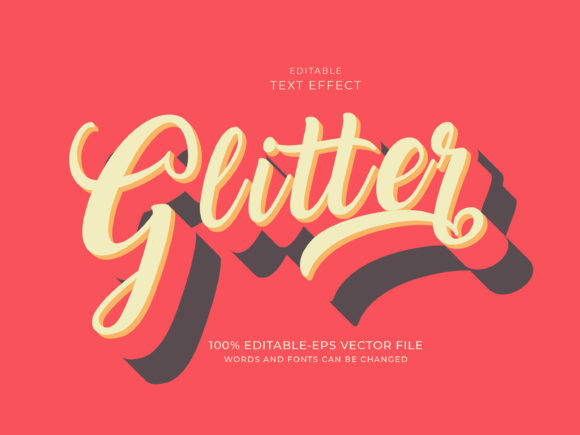
Depth is achieved through extrusion. This means giving the text a visible third dimension, typically by creating a front face, side faces (the extrusion), and a back face. The thickness of the extrusion determines how dramatic the 3D effect feels. A thin extrusion might look subtle and elegant, while a thick one feels chunky, playful, and almost toy-like. For glitter text, the extrusion layer often uses a darker or slightly muted version of the glitter color to simulate shadow, while the front face gets the full sparkle treatment.
Light is what makes glitter glitter. Without highlights and reflections, glitter would just look like colored sand. The magic happens when you simulate tiny light-catching facets across the surface of the text. This is often done using noise filters, sparkle brushes, or custom gradient maps that scatter bright white and light-colored pixels across the letterforms. In a 3D Glitter Text Effect, the highlights should follow the contours of the letters and also appear on the edges of the extrusion, as if a light source is hitting the text from a specific angle.
Texture is the final piece. A flat color gradient will never look like glitter. You need a granular, speckled texture that mimics the random arrangement of glitter particles. This texture is usually overlaid on the base color and can be sourced from actual glitter photographs, procedural noise generators, or custom brushes. The key is scale: the glitter particles should be small enough to look realistic but large enough to be visible at the intended display size.
Where the 3D Glitter Text Effect Shines Brightest
While the 3D Glitter Text Effect can technically be used anywhere, it performs exceptionally well in specific contexts. Understanding these use cases helps you apply the effect with intentionality rather than just for decoration.
Event and Celebration Graphics
Birthday invitations, New Year's Eve promotions, wedding signage, and anniversary announcements all benefit from the celebratory feel of glitter. The 3D aspect adds a sense of importance and physicality, making the text feel like a real object rather than a flat digital afterthought. Imagine a "Happy 50th" banner where the numbers look like they are carved from a block of gold glitter. The effect immediately communicates festivity and luxury.
Social Media Content and Thumbnails
On platforms like Instagram, TikTok, and YouTube, the first impression is everything. Creators frequently use the 3D Glitter Text Effect for video thumbnails, story highlights, and channel titles. The combination of depth and sparkle makes the text pop against busy backgrounds or video stills. Beauty influencers, makeup artists, and fashion brands often use this style to align with the high-gloss, aspirational aesthetic of their content. A thumbnail that says "GLOW UP" in glittering 3D text is far more clickable than one using standard sans-serif typography.
Product Packaging and Branding
In the physical world, glitter is expensive and messy to print. But digital mockups and e-commerce visuals can use the 3D Glitter Text Effect to simulate premium packaging without the production cost. Cosmetic brands, for example, might use this effect to showcase a product name on a digital advertisement or a website hero banner. The effect suggests that the physical product will have a similar sparkle, creating a cohesive brand promise between the digital ad and the real-world item.
Practical Workflows for Creating 3D Glitter Text
Creating a 3D Glitter Text Effect can be approached in several ways, depending on your skill level, the tools available, and the desired level of realism. Here is a breakdown of common methods and how they compare.
Using 3D Software for Maximum Realism
Programs like Blender, Cinema 4D, or Adobe Dimension allow you to create true three-dimensional geometry for your text. You can extrude the letterforms, apply a glitter material with reflective properties, and set up realistic lighting with multiple light sources. The advantage of this approach is that the result looks genuinely three-dimensional because it is. You can rotate the text, apply environmental reflections, and even animate the sparkle. However, the learning curve is steeper, and rendering times can be significant. This method is best for professional designers who need high-quality output for print or broadcast.
Simulating the Effect in Photoshop or Affinity Photo
For most designers, a 2D image editor is the most practical tool. The 3D Glitter Text Effect can be convincingly simulated using layer styles, blending modes, and texture overlays. Start by typing your text and applying a bevel and emboss effect to create the illusion of depth. Then, add a glitter texture on top of the text layer, set the blending mode to Screen or Overlay, and adjust the opacity. You can further enhance the effect by adding inner shadows and highlights that match the contours of the bevel. This approach is fast, flexible, and does not require 3D modeling skills. It is ideal for social media graphics, web banners, and digital invitations.
Using Online Generators and Templates
For absolute beginners or those who need results quickly, online text effect generators offer pre-built 3D Glitter Text Effect options. You simply type your text, choose a glitter color and style, and download the result. While convenient, these tools often produce generic results that lack customization. They are useful for one-off projects or when you are in a time crunch, but for branding or professional work, custom creation is usually preferred to maintain uniqueness and quality control.
Key Considerations Before You Start
Before diving into a project featuring the 3D Glitter Text Effect, there are several practical factors to keep in mind. These considerations can save you time and ensure the final result meets your expectations.
Legibility is paramount. Glitter, by its nature, introduces visual noise. If the glitter texture is too large or the contrast between the text and the background is too low, the words become difficult to read. Always test your design at the actual size it will be viewed. What looks clear on a 27-inch monitor might become an illegible sparkly mess on a smartphone screen. Use a strong contrast between the text and the background, and consider keeping the glitter effect more subtle on smaller text sizes.
Color selection matters enormously. The 3D Glitter Text Effect can be created in virtually any color, but not all colors read equally well. Gold, silver, rose gold, and holographic rainbow are classic choices because they have built-in brightness. Dark glitter colors, like deep blue or emerald green, can look sophisticated but may require stronger highlights to maintain the sparkle effect. Avoid using colors that are too close to the background color, as the depth and glitter will be lost.
File format and export settings. If you are using the text in a digital format, PNG with transparency is usually the best choice. This preserves the 3D and glitter details without a background. For print, ensure your resolution is at least 300 DPI and that your color mode is CMYK. Glitter effects often rely on bright highlights that can get dulled during the CMYK conversion, so you may need to adjust the contrast and brightness after converting.
Common Mistakes and How to Avoid Them
Even experienced designers can stumble when working with the 3D Glitter Text Effect. Here are some of the most frequent pitfalls and how to sidestep them.
Overdoing the sparkle. More glitter is not always better. Too many sparkles or overly large glitter particles can make the text look noisy and unprofessional. Aim for a balance where the glitter is clearly visible but does not overwhelm the letterforms. The depth from the 3D aspect should remain the primary structural element, with the glitter serving as the surface finish.
Ignoring the light source. If your glitter highlights are scattered randomly without any consideration for where the light is coming from, the effect will look flat and artificial. Even with a simulated 3D bevel, the highlights should cluster on the top and left edges (if that is where your light source is) and fade toward the shadows. Consistency in lighting creates believability.
Forgetting the shadow. A 3D effect without a proper drop shadow or cast shadow looks like it is floating in space. The shadow grounds the text and reinforces the illusion of depth. For a 3D Glitter Text Effect, the shadow should be soft but defined, and it should match the direction of the extrusion. A mismatched shadow breaks the illusion instantly.
Observing the Trend and Making It Last
The 3D Glitter Text Effect has enjoyed periodic revivals in design trends, often coinciding with nostalgia for the 80s, 90s, and early 2000s aesthetics. However, it is not merely a passing fad. When used with restraint and purpose, it remains a powerful tool in any designer's arsenal. The key to making it feel current rather than dated is to pair it with clean, modern layouts. Let the glitter text be the star of the show, and keep the surrounding design minimal. A white or black background with a single 3D Glitter Text Effect headline looks sophisticated and intentional. The same effect buried in a busy, patterned layout quickly becomes chaotic.
For those looking to integrate this style into their regular workflow, building a library of reusable glitter textures and pre-saved layer styles can save enormous amounts of time. Once you have a base 3D Glitter Text Effect template, you can easily swap out the text, adjust the color, and apply it to new projects. This efficiency allows you to deliver high-impact designs without starting from scratch every time.
Final Thoughts on Dazzling Typography
The 3D Glitter Text Effect is more than just a visual trick. It is a statement. It says this text is important, this moment is special, and this design is meant to be noticed. By understanding the mechanics of depth, light, and texture, and by carefully considering the context in which the text will appear, you can create typography that resonates with viewers on both an aesthetic and emotional level. Whether you are a seasoned designer or a curious beginner, experimenting with this effect will expand your creative capabilities and give you a go-to technique for projects that demand a little extra sparkle.