Understanding 3D Fruits SVG Bundles: A Complete Guide to Digital Art That Pops
If you have browsed design marketplaces recently, you have likely come across something called a 3D Fruits SVG Bundle. These collections of vector graphics have gained remarkable popularity among crafters, educators, web designers, and small business owners alike. But what exactly makes them special, and why are so many people turning to them for their creative projects? This guide walks you through everything you need to know about 3D Fruits SVG Bundles—from what they are, to how they work, to why they matter in today's visually driven world.
What Exactly Is a 3D Fruits SVG Bundle?
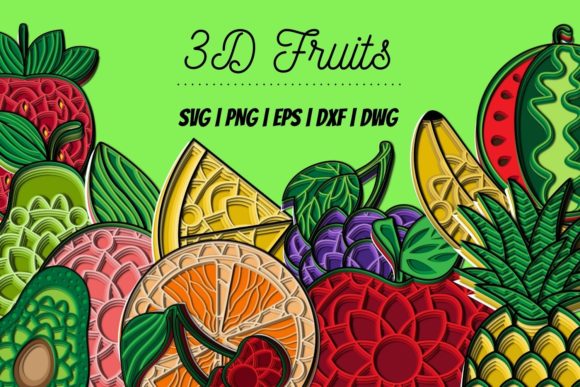
At its core, a 3D Fruits SVG Bundle is a curated collection of fruit-themed vector graphics designed to simulate a three-dimensional appearance. Unlike flat, two-dimensional illustrations, these SVGs use shading, highlights, gradients, and perspective tricks to make each fruit look rounded, tactile, and almost real enough to touch. The "bundle" part simply means you receive multiple files—often dozens or even hundreds—packaged together for a single price.
SVG stands for Scalable Vector Graphics. Unlike pixel-based images such as JPEGs or PNGs, SVGs are built using mathematical equations that define lines, curves, and shapes. This means they can be scaled up or down infinitely without losing any quality. A tiny apple icon on a mobile screen and a massive watermelon graphic on a billboard will both remain crisp and clear when created from the same SVG file.
When you add the "3D" element to an SVG, you are essentially using vector techniques to create the illusion of depth. Designers achieve this through layered shapes, gradient fills, and carefully placed highlights that mimic how light interacts with curved surfaces. The result is a graphic that feels dimensional and lively, even though it remains a fully editable vector file.
The Rise of 3D Design in Everyday Creativity
The demand for 3D-style graphics has surged in recent years, and it is not hard to see why. Our visual landscape—from social media feeds to website headers to product packaging—has become increasingly saturated. Flat, simple icons that worked a decade ago now struggle to capture attention. Consumers and audiences expect more depth, more richness, and more visual interest.
3D fruit graphics hit a sweet spot because they combine familiarity with freshness. Everyone recognizes an apple, a banana, or a strawberry. But when that apple looks glossy, rounded, and almost tangible, it triggers a stronger emotional and sensory response. This makes 3D Fruits SVG Bundles particularly effective for:
- Food and beverage brands that want appetizing visuals for menus, labels, and ads.
- Educational materials aimed at teaching children about healthy eating.
- Digital content creators who need eye-catching thumbnails or social media graphics.
- DIY crafters who create stickers, T-shirt designs, and home decor items.
Because SVGs are lightweight and resolution-independent, they fit seamlessly into both print and digital workflows. A 3D fruit graphic that looks stunning on a website can also be printed on a canvas tote bag without any loss of detail.
Why Choose SVG Format for 3D Fruit Graphics?
You might wonder: if 3D effects are so desirable, why not just use a 3D rendering software or a high-resolution photograph? The answer lies in the unique advantages of the SVG format itself. Here are several reasons why 3D Fruits SVG Bundles have become a go-to resource:
Infinite Scalability Without Quality Loss
As mentioned earlier, SVGs are resolution-independent. You can enlarge a tiny cherry to the size of a poster, and it will remain perfectly sharp. Photographs and raster graphics, by contrast, become pixelated and blurry when scaled up. For anyone who works across multiple platforms and print sizes, this is a game changer.
Complete Editability
SVG files can be opened and edited in vector design software like Adobe Illustrator, Inkscape, Affinity Designer, and even some free online editors. You can change colors, resize individual elements, remove a highlight, or add a shadow. This means a single bundle can be adapted to match any brand palette or creative vision.
Small File Sizes
Compared to high-resolution photographs or complex 3D model renders, SVG files are remarkably small. They load quickly on websites, consume minimal storage space, and can be shared easily via email or cloud storage.
Transparent Backgrounds
Most 3D Fruits SVG Bundles come with transparent backgrounds, which makes them incredibly versatile. You can place a 3D orange onto any colored background, overlay it on a photograph, or combine it with other graphics without ugly white boxes around it.
Cross-Platform Compatibility
SVG is an open, widely supported standard. Modern web browsers, design tools, and even many cutting machines (like Cricut and Silhouette) accept SVG files natively. This makes them a universal choice for both digital design and physical crafting.
Practical Applications Across Industries
The true value of a 3D Fruits SVG Bundle becomes clear when you look at how different people put it to use. Here are some real-world examples that illustrate the breadth of its application:
Small Business Owners and Entrepreneurs
Imagine you run a small juice bar or a healthy snack subscription box. You need branded materials—menus, social media posts, flyers, stickers for packaging—that make your products look fresh and appealing. A 3D Fruits SVG Bundle gives you professional-grade graphics without hiring a designer for every single asset. You can create a cohesive look across all your touchpoints using the same set of high-quality fruit illustrations.
Teachers and Educators
Classroom materials for nutrition lessons, biology units on plants, or even math activities (like counting fruits) benefit from visuals that engage young learners. 3D fruit graphics are more captivating than flat icons, and because they are scalable, a teacher can print them as large posters or as small flashcards without worrying about resolution.
Graphic and Web Designers
For professionals, time is money. Instead of creating custom 3D fruit illustrations from scratch for every project, designers can pull a cherry, a lemon, or a pineapple from a well-organized bundle and drop it into a layout. The editable nature of SVGs means further customization is quick and easy. This accelerates workflow while maintaining a high visual standard.
DIY Craft Enthusiasts
Cricut and Silhouette users love SVGs because their cutting machines read vector paths directly. A 3D fruit design can be used to cut iron-on vinyl for a T-shirt, create layered paper cards, or make adhesive decals for a water bottle. The three-dimensional shading adds a premium look to handmade items that customers are often willing to pay more for.
Common Misunderstandings About 3D SVGs
Despite their popularity, several misconceptions persist about 3D Fruits SVG Bundles. Let me address a few of the most common ones.
Misunderstanding: "3D SVGs are the same as 3D models."
This is a frequent point of confusion. A 3D model (like an OBJ or STL file) is a mathematical representation of a three-dimensional object that can be rotated, lit from different angles, and used in animation or 3D printing. A 3D SVG, on the other hand, is a two-dimensional vector graphic that looks three-dimensional but cannot be viewed from different angles. It is a flat image with simulated depth, not an actual 3D object.
Misunderstanding: "You need expensive software to use SVGs."
While professional tools like Adobe Illustrator offer advanced editing capabilities, many free and low-cost options work perfectly well. Inkscape, Vectr, and even web-based platforms like Canva (with SVG uploads) allow you to open and customize SVG files. For basic resizing and color changes, you do not need a costly subscription.
Misunderstanding: "All 3D fruit SVGs look cartoonish."
Quality varies widely across different bundles and designers. Some 3D fruit SVGs are indeed stylized and playful, while others aim for realistic shading and proportions. When shopping for a bundle, look at the preview images carefully. High-quality bundles often include fruits with subtle gradients, soft shadows, and natural color variations that mimic real produce.
How to Choose the Right 3D Fruits SVG Bundle
With so many options available, selecting a bundle that fits your needs requires a bit of discernment. Here is a checklist of factors to consider:
- Variety of fruits included. Does the bundle cover the fruits you actually need? A general bundle might include apples, bananas, oranges, grapes, strawberries, and lemons. A more specialized bundle might focus on tropical fruits or berries.
- Consistency of style. If you plan to use multiple fruits together in a single project, make sure they share a similar shading style and level of detail. Mismatched styles can look disjointed.
- File formats offered. While SVG is the star, many bundles also include PNG, EPS, DXF, and AI files. Having multiple formats gives you flexibility across different software and machines.
- Commercial license terms. If you intend to sell products featuring the graphics, check the license. Some bundles allow unlimited commercial use, while others restrict the number of sales or require attribution.
- User reviews and previews. Look for bundles with clear, large preview images and honest reviews from other buyers. Pay attention to comments about file quality, ease of editing, and customer support.
Tips for Getting Started with 3D Fruit SVGs
If you are new to working with SVGs, here are a few practical pointers to help you hit the ground running:
- Start simple. Pick a fruit like a lemon or a lime to practice resizing and recoloring. These shapes are straightforward and forgiving for beginners.
- Experiment with layering. One of the beauties of 3D SVGs is that they often consist of multiple overlapping shapes. Try separating these layers in your editor to understand how the 3D effect is constructed.
- Combine fruits with typography. A bold headline paired with a 3D fruit graphic creates an instant visual hierarchy. This works well for flyers, social media posts, and menu boards.
- Use a consistent color palette. Even though the fruits come in natural colors, you can unify them by applying a tint or adjusting the saturation. This helps create a cohesive brand identity.
- Test before committing. Most design software allows you to preview how an SVG will look at different sizes. Always scale your graphic to the final intended size early in the process to avoid surprises later.
Where 3D Fruits SVG Bundles Fit into Modern Creativity
We live in a time when visual communication dominates. From the moment we wake up and check our phones to the billboards we pass on the street, images shape our understanding of the world. Having access to high-quality, adaptable, and affordable design resources like 3D Fruits SVG Bundles democratizes creativity. You do not need to be a professional illustrator to produce polished, professional-looking work. You just need the right tools and a little bit of curiosity.
Whether you are designing a menu for a farm-to-table restaurant, creating a lesson plan for a kindergarten class, building a website for a health blog, or making custom gifts for a farmer's market booth, these bundles offer a shortcut to visual impact. They save time, reduce costs, and open up creative possibilities that might otherwise feel out of reach.
Final Thoughts
A 3D Fruits SVG Bundle is more than just a collection of pretty pictures. It is a practical resource that bridges the gap between professional design quality and everyday usability. By understanding what SVGs are, how 3D effects are achieved, and where these graphics can be applied, you unlock a versatile tool for your creative toolkit.
The next time you see a glossy, mouthwatering fruit graphic on a website or a product, you will know exactly how it was made—and you will also know that you can create something just as impressive yourself. Whether you are a seasoned designer or a complete beginner, the world of 3D fruit SVGs is ripe with opportunity.