3D Rendering Family Room Voxel Art: What You Need to Know Before You Start
If you have spent any time exploring digital art or architectural visualization lately, you have likely come across a striking style that feels both nostalgic and fresh: 3D rendering family room voxel art. It combines the warmth of a lived-in space with the blocky, charming aesthetic of voxel-based modeling. Whether you are a hobbyist looking to create your first cozy scene, a freelancer hoping to offer something different to clients, or a small business owner considering voxel art for marketing visuals, this style offers a unique way to communicate comfort and playfulness. But as with any specialized technique, there are pitfalls that can turn a promising project into a frustrating experience. Let us walk through what this art form really involves and how to avoid the most common missteps.
What Exactly Is 3D Rendering Family Room Voxel Art?
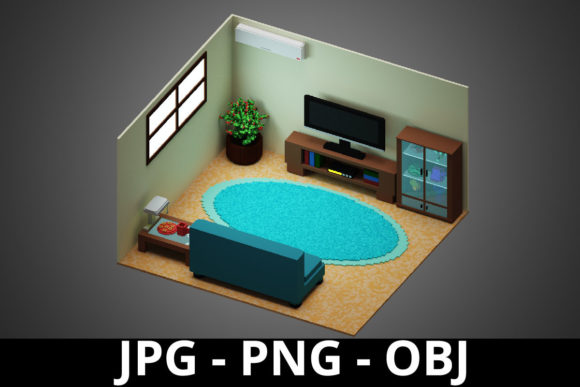
At its core, 3D rendering family room voxel art is the practice of building a three-dimensional family room scene using voxels—volumetric pixels that act like digital cubes. Unlike traditional polygon-based 3D modeling, voxel art gives everything a consistent, blocky look reminiscent of classic video games. The family room setting is especially popular because it allows artists to explore warmth, clutter, lighting, and human presence in a contained space. People are drawn to it because it feels accessible: the blocky style hides complexity while rewarding attention to detail. But that very accessibility can lead to assumptions that cause trouble later.
Mistake Number One: Treating Voxel Art Like Low-Poly Modeling
A common misunderstanding is that voxel art and low-poly 3D are interchangeable. They are not. Low-poly models use simplified surfaces with fewer polygons to create an angular look, but voxel art builds everything from uniform cubes. When beginners approach family room scenes as if they were low-poly interiors, they often end up with floating furniture, inconsistent floor grids, and objects that look disconnected from the environment. The issue is not the aesthetic—it is the structural logic. Voxels demand grid alignment. A sofa, a lamp, or a coffee table must snap to the same voxel grid as the walls and floor, or the scene will feel broken.
The fix is simple: always start with a ground plane on an explicit grid, and build every object on that same grid. Use snapping tools when available. If you are modeling manually, keep a reference cube with your chosen voxel resolution nearby. Check that every piece of furniture sits cleanly on the floor without gaps or overlaps. This one habit will save you hours of cleanup later and make your scene feel solid rather than chaotic.
Mistake Number Two: Overlooking Scale and Proportion
Because voxel art uses cubes, it is tempting to treat every object as roughly the same size. But a family room needs recognizable scale cues. A television that is the same height as a doorway, or a coffee table that towers over the sofa, immediately breaks believability. The charm of voxel art comes from its blocky simplicity, not from ignoring real-world relationships. Viewers subconsciously expect a chair to be lower than a table, and a rug to sit under furniture, not float beside it.
To get scale right, establish a base unit early. Decide that one voxel equals, for example, two inches or five centimeters. Then plan your furniture dimensions accordingly. A typical sofa might be thirty voxels wide, eighteen deep, and twelve high. A floor lamp might be forty voxels tall with a base of four voxels. Keep a reference sheet of these dimensions as you work, and periodically step back and look at your scene from a distance. Better yet, place a human figure—even a simple voxel character—in the room to check proportions. That figure will instantly reveal whether your furniture is oversized or undersized.
Mistake Number Three: Ignoring Lighting in a Blocky World
Many newcomers assume that voxel art, with its retro feel, does not need realistic lighting. This could not be further from the truth. A flatly lit family room scene, where every cube has the same brightness, looks lifeless and confusing. Depth, mood, and readability all depend on light and shadow. The best 3D rendering family room voxel art uses directional light to cast soft shadows, creates warm pools of light around lamps, and lets shadows anchor furniture to the floor. Without these cues, the scene becomes a jumble of blocks.
Avoid the flat look by setting up at least one primary light source—often an overhead or window light—and at least one accent light, such as a table lamp. Use ambient occlusion if your software supports it, or simulate it by darkening corners and crevices manually. Pay attention to the color of your light: warm yellowish tones make a family room feel cozy, while cool blue light can make it feel sterile. Experiment with light intensity and direction until the room has depth. If you export a single still image, check that the lighting tells a story about the time of day or the mood you want.
Mistake Number Four: Cluttering Without Purpose
Family rooms are supposed to look lived in, but there is a fine line between cozy and chaotic. A common mistake in voxel art is adding too many small objects—books, plants, toys, cushions—without considering how they interact with the space. Because voxels are uniform, clutter can quickly become visual noise. Each object competes for attention, and the overall composition suffers. Worse, poorly placed clutter can obscure important features like doorways or windows, making the room feel cramped.
The better approach is to plan your clutter intentionally. Decide on a focal point, such as a fireplace, a large window, or a media center. Arrange furniture to support that focal point. Then add only the items that reinforce the story of the room. A few books on a shelf, one plant by the window, a single rug—these can communicate "lived in" without overwhelming the scene. Group small objects together rather than scattering them. And always ask yourself: does this item make the room more readable or less? If it adds confusion, remove it.
Mistake Number Five: Forgetting the Human Element
It is easy to focus entirely on furniture and architecture, but a family room without any suggestion of human presence often feels empty and cold. You do not always need a fully detailed character, but adding subtle hints of life—a half-open book on the sofa, a mug on the table, a blanket draped over an armchair—invites the viewer to imagine the people who live there. This is what separates a generic room render from one that feels like a home.
Include at least two or three personal touches that suggest recent activity. A pair of slippers by the door, a remote control on the coffee table, a plant that has been watered recently. These small details cost little in modeling time but pay large dividends in emotional resonance. If you are creating the scene for a client, ask about the family that lives there. Are they young, older, artistic, sporty? Tailor the details to match. That level of thoughtfulness will make your work stand out.
Mistake Number Six: Choosing the Wrong Tool or Workflow
Not all 3D software handles voxels well. Some tools are designed for high-poly sculpting and struggle with the grid-based logic of voxel art. Others offer dedicated voxel editors but have steep learning curves. Beginners often pick a tool based on popularity rather than suitability, then fight against its limitations. The result is wasted time and frustration.
Before you commit, research tools that are built for voxel modeling or have strong voxel support. Options like MagicaVoxel, Qubicle, and Avoyd are designed specifically for this workflow. They offer grid snapping, color palettes, and export options that make voxel art efficient. If you prefer a more general-purpose 3D suite, look for plugins or modes that enforce a voxel grid. Test the tool with a small scene before investing hours into a full family room. Check that you can easily adjust lighting, camera angle, and export resolution. A good tool should let you iterate quickly, not fight against you.
What to Check Before You Share or Sell Your Work
Before you call a piece finished, step through a short checklist. First, verify that every object sits cleanly on the floor or on another surface—no floating cubes. Second, examine the lighting from multiple angles. Third, check that the scale makes sense by comparing object sizes. Fourth, ensure that the color palette is cohesive and not overly saturated or muddy. Fifth, test how the image looks at different output sizes. A scene that looks great at full resolution may become noisy or indistinct when scaled down for a website or portfolio thumbnail.
Finally, consider the audience. If you are creating this for a client or for public display, think about what story the room tells. A well-executed 3D rendering family room voxel art piece should feel like a snapshot of a real moment—a quiet afternoon, a game night, a rainy day inside. That emotional hook is what makes people stop and look, and it is what turns a technical exercise into memorable art.
By avoiding these common mistakes and approaching your work with intention, you will create scenes that are not only technically sound but genuinely inviting. Voxel art is a forgiving medium in terms of geometric complexity, but it rewards those who respect its constraints. Build deliberately, light thoughtfully, and let the details speak for themselves.