How the 3D Podium Minimal Scene Studio Room Fits Into Real Projects
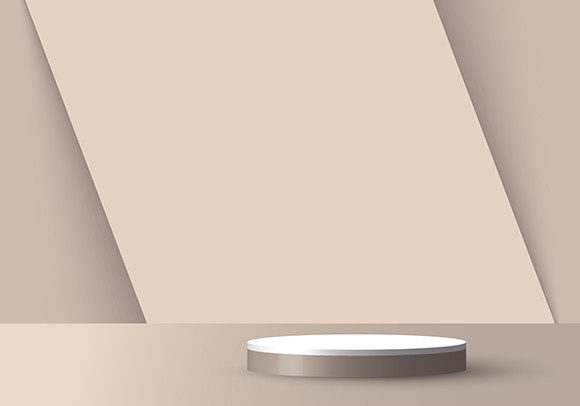
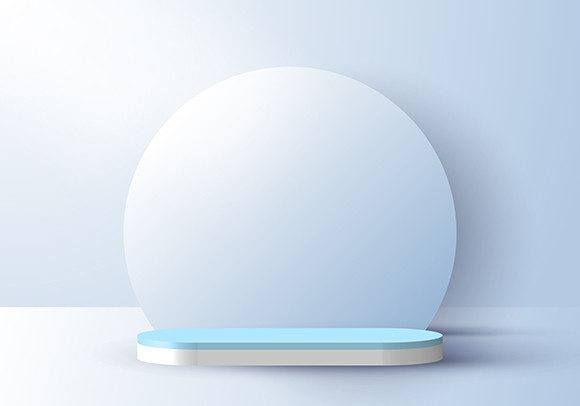
When you first hear “3D Podium Minimal Scene Studio Room,” it might sound like a niche piece of digital furniture. But after working with it across different kinds of projects, you realise it’s one of those tools that quietly solves multiple problems. It’s a clean, uncluttered 3D environment built around a central podium, designed to showcase something—whether that’s a person, a product, or an idea. The room itself is simple: soft lighting, neutral surfaces, and enough space to keep the focus exactly where you want it.
In practice, this scene becomes a shortcut. Instead of building a studio setup from scratch, you drop your subject into a ready-made, professional-looking room. That saves hours of modelling, texturing, and lighting work. But more importantly, it gives you a consistent backdrop that works for many different situations. Let’s look at where, when, and why people actually use it.
Where Creators Use It for Everyday Visual Content
If you’re a content creator—whether for YouTube, Instagram, or a personal blog—you know how hard it is to keep your visuals looking polished without spending a fortune on gear. A 3D podium scene can be your virtual recording studio. You render your character or avatar standing at the podium, and suddenly your talking-head video has a professional set behind it. It works for tutorials, opinion pieces, or even product reviews.
Virtual Presentations and Live Streams
Many creators now host live streams or record video pitches where a simple webcam background feels flat. The podium scene adds depth. You don’t need a real podium in the room. You use the 3D scene as your background, and your video appears naturally layered on top. The minimal aesthetic means it doesn’t distract—viewers focus on what you’re saying, not on messy shelves or blank walls.
Portfolio Showcases
Photographers, 3D artists, and designers often need a way to display their work in a context that feels credible. The podium becomes a pedestal for a sculpture, a piece of furniture, or even a digital painting. Because the room is minimal, the audience’s eye goes straight to the object. This is useful for updating a portfolio site or creating promotional renders for social media.
Professional Use Cases for Marketers and Entrepreneurs
Small business owners and marketers frequently need product images or promotional visuals that look high-end without the high-end price tag. The 3D podium scene acts as a versatile product studio.
Product Launches and E‑Commerce
Imagine you’re launching a new gadget—say, a smart speaker or a leather notebook. You can place it on the podium, adjust the lighting to match your brand, and render multiple angles. The clean background makes the product stand out in an online store. You don’t need a physical photo studio or an expensive photographer. You just need the 3D scene and a bit of rendering time. The same scene can be reused for different products by swapping out the model.
Corporate Presentation Backdrops
When a startup pitches to investors or presents at a virtual conference, the visual environment matters. A messy office or a generic virtual background doesn’t inspire confidence. The podium scene with a subtle logo or colour grade can serve as a branded stage. You can render a short animation of the CEO walking up to the podium, or use a still as the slide background. It communicates professionalism without looking overproduced.
Educational and Training Scenarios
Educators and trainers often struggle to make online classes feel engaging. A sterile slide deck can lose students after five minutes. The 3D podium room offers a way to anchor a lesson in a familiar, physical-like setting.
Lecture Recordings and Course Content
A history professor might record themselves explaining a concept with a virtual podium in the scene. The room feels like a lecture hall, but without the echo and bad lighting of a real one. For an online course on public speaking, the podium itself becomes a teaching tool. Students can see how a speaker stands, where to look, and how to use gestures in a defined space.
Training Simulations
Corporate trainers can use the scene to simulate a press conference or a product demo. New employees can practice their presentation skills in a environment that looks realistic but is completely controlled. The minimal room reduces anxiety because there’s no real audience—just a virtual podium. This type of low‑stakes practice builds confidence before the real event.
Digital and Commercial Applications
Beyond individual creators and small businesses, the scene finds a home in digital agencies, game development, and even virtual event production.
Virtual Event Stages
With the rise of virtual trade shows and conferences, many organizers need multiple “rooms” or stages for different sessions. The podium scene can be the main stage where a keynote speaker presents. By customising the lighting and adding a screen behind the podium, it becomes a functional set. Developers can integrate it into a 3D virtual world using platforms like Unity or Unreal Engine, giving attendees a sense of place.
Architectural Visualization and Interior Renders
Sometimes architects or interior designers need a quick scene to show how a space might feel when someone uses it. The podium room serves as a clean environment to drop in a human figure or furniture. It’s not meant to replace detailed walkthroughs, but for early client pitches or mood boards, it works fast. You can render a daytime version and a nighttime version to show atmosphere.
Print and Digital Advertisements
Ad agencies or freelance graphic designers might use the scene to create mockups for poster ads or social media banners. A perfume bottle on the podium with soft shadows looks elegant. A smartphone on the same podium with a reflective surface looks modern. Because the scene is minimal, the product feels premium without visual clutter.
What to Consider Before Using the Scene
Like any tool, this 3D scene has strengths and limitations. To get the most out of it, you need to think about a few things before you start.
Software Compatibility and Rendering
The scene file needs to open in the software you already use—Blender, Cinema 4D, Maya, or a real‑time engine like Sketchfab or Twinmotion. Check the file format and version. Some scenes come with optimised textures that render quickly; others might require a powerful graphics card. If you’re on a laptop with integrated graphics, test a small render first. The minimal design usually helps with performance because there are fewer polygons and lights.
Customisation Requirements
A minimal scene is a starting point, not a final product for every use. You likely need to adjust the camera angle, add your own textures (like a floor or wall colour), or insert props. For example, if you want the podium to look like wood instead of plastic, you’ll need to change the material. Plan time for that. A scene that’s too generic can feel empty. The best results come when you tailor it to your brand or subject.
Lighting and Atmosphere
Lighting in the scene might be a fixed studio setup. If you need a dramatic look—harsh shadows or golden hour glow—you may need to add your own light sources. Conversely, if the scene has too much ambient light for your product, you might need to dim it. Understand how to control the lights inside your 3D software. Many scenes come with sliders for intensity and colour, but not all.
Scale and Proportion
A podium that looks perfect for a speaker might dwarf a small product. Adjust the scale of your object or the podium itself. Pay attention to the camera’s focal length; a wide lens can stretch the room and make it feel bigger, while a long lens flattens it. Test a few compositions before committing to one.
Usage Rights and Licenses
If you’re buying the scene from a marketplace, read the license carefully. Some allow commercial use; others restrict it to personal projects or require attribution. If you plan to use it in client work or sell renders, make sure the license covers that. Most minimal podium scenes are sold with a Royalty Free license, but always double‑check.
Why the Minimal Style Works for So Many Situations
The biggest advantage of this type of scene is its neutrality. When you need a background that doesn’t compete with your subject, a minimal room is effectively invisible in a good way. It gives the impression of a professional studio without forcing a specific style. That’s why you see similar scenes used for product photography, talking‑head videos, and 3D art portfolios. The same geometry can be warm or cold, corporate or creative, depending on how you colour it.
For a freelancer who juggles different clients, having one adaptable scene saves time and mental energy. Instead of building a new environment for each project, you tweak the existing one. For a small business owner, it reduces the barrier to producing visual content that looks consistent. For a teacher, it turns an online lecture into something closer to an in‑person experience.
Ultimately, the value of a 3D podium minimal scene studio room comes from how you use it. It’s not a magic fix—you still need to place your subject, adjust the lighting, and decide on the mood. But if you do those things well, the scene does the heavy lifting. It provides the clean stage, and you provide the story.